by RMLS Communication Department | Jun 3, 2010 | RMLS News, RMLSweb
The new, improved CMA report has arrived
 The transformed RMLSweb CMA (Comparative Market Analysis) has a brand new look and feel, as well as a new location! In addition to an extensive remodel of CMA, RMLSweb also now contains a Radius Search and enhanced User Preferences. Creating a CMA has never been easier and yet offered so many customizable options to set your CMA apart from the rest!
Highlights of the CMA include:
1) Navigate forwards and backwards without losing data
2) Adding comparables via seven different methods (MLS Numbers, Radius Search, Map Search, Address Search, Advanced Search, MLS Number Search, Saved MLS Numbers)
3) Saving the CMA in progress
4) Printing to PDF, printing to your printer, or e-mail with the touch of a button
5) Reorder your comparables or the pages of your CMA report by dragging and dropping them into the order you desire
6) Incorporate properties that are in different categories (ex: Farms/Ranches + Lots/Lands)
7) Display your recommended price through a graph
8) Customize your report with pages dedicated to Company Information, your Resume, and/or color themes to match your office/team
9) Auto-populate subject property information with Tax ID or previous MLS #
For more information, print out our quick reference guide.
Want a trainer to come out to your office and demonstrate this enhanced functionality? Call our Training Manager, Kerry Meeuwsen at 503-872-8051 or e-mail kerry.m@rmls.com.
by RMLS Communication Department | Jun 2, 2010 | Events
This June, get educated with FREE RMLSweb training
Here’s a quick rundown of upcoming real estate events & education for June in Oregon & Southern Washington. If you have an event that is not listed here, please let us know by commenting below. For future events, please send an e-mail to communications (at) rmls (dot) com.
Events around the Region:
–June 3: RMLS™ sponsors the BuzzRE event at McMenamins Edgefield
-June 7: Oregon Chapter Council of Residential Specialists presents the “Ninja Selling with Walt Frey” CRS course in Salem, Oregon
-June 9: Earth Advantage® presents the “What’s Green Building?” seminar
-June 10: Women’s Council of Realtors® Portland Chapter presents the “Keeping You Legal” business resource breakfast
-June 14: PMAR® presents the “Short Sales: The Fine Print” course offering a one hour elective continuing education credit
-June 15: HBA Communications Committee and Sales & Marketing Council present “Building Your Business From the Foundation Up”
-June 22-25: OAR® presents Oregon GRI Course (Realtor® Institute)
Also, if you’re an RMLS™ subscriber, we have lots of FREE opportunities for continuing education credit at a location near you; click the link for your area to view the June Training Calendar:
– Coos County
– Eastern Oregon
– Eugene
– Florence
– Gresham
– Hood River
– Portland
– Roseburg
– Salem
– Vancouver
by RMLS Communication Department | Jun 1, 2010 | RMLS News, RMLSweb
The new, improved CMA report arrives soon
The transformed RMLSweb CMA (Comparative Market Analysis) will have a brand new look and feel, as well as a new location! In addition to an extensive remodel of CMA, RMLSweb will also contain a Radius Search and enhanced User Preferences. Creating a CMA has never been easier and yet offered so many customizable options to set your CMA apart from the rest!
Highlights of the CMA include:
1) Navigate forwards and backwards without losing data
2) Adding comparables via seven different methods (MLS Numbers, Radius Search, Map Search, Address Search, Advanced Search, MLS Number Search, Saved MLS Numbers)
3) Saving the CMA in progress
4) Printing to PDF, printing to your printer, or e-mail with the touch of a button
5) Reorder your comparables or the pages of your CMA report by dragging and dropping them into the order you desire
6) Incorporate properties that are in different categories (ex: Farms/Ranches + Lots/Lands)
7) Display your recommended price through a graph
8) Customize your report with pages dedicated to Company Information, your Resume, and/or color themes to match your office/team
To schedule a preview of the new CMA, contact Kerry Meeuwsen, the RMLS™ Training Manager, at (503) 872-8051 or kerry.m@rmls.com.
by RMLS Communication Department | Jun 1, 2010 | Lockbox, Statistics, Supra
Activity rises again in both states
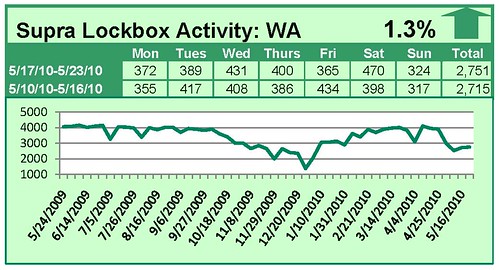
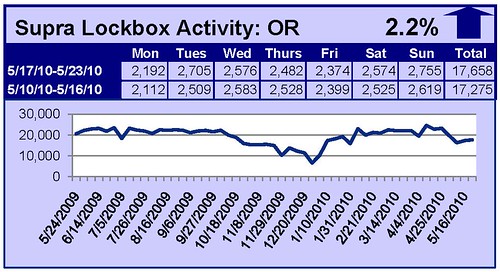
When comparing the week of May 17 – May 23 with the week prior, the number of times an RMLS™ subscriber opened a Supra lockbox increased 1.3% in Washington and increased 2.2% in Oregon.
Click the chart for a larger view
Archive
View an archive of the Supra lockbox statistical reports on Flickr.
by RMLS Communication Department | May 28, 2010 | Supra
Updates make support quicker and more efficient
At the end of last year, Supra announced some enhancements that are useful for agents who need to speak to a support representative. Now, when you contact Supra for support, you can enter your serial number and automatically be directed to the correct support representative.
Instead of being required to select from a menu, you will be directed based on your key type, the status of your key, or the status of your account. This means that you will spend less time on the phone.
Here are the key benefits of the new phone system:
- When calling in, agents will be asked to enter their key serial number and PIN code. This will help confirm that the key is in the possession of the authorized user. The serial number is then used to direct their call to the correct support representative.
- Because the system knows what kind of key the agent has (based on the serial number), it helps ensure that the agent is connected to the correct representative. In this way the agent can get their questions answered quicker.
- If a customer doesn’t know their serial number, they will still be able to get assistance by choosing to be directed to a support representative.
- In some cases, the new system may advise callers to contact their MLS directly. This could happen under specific circumstances such as:
- The keyholder is on “hold” or “inactive” status.
- The keyholder is not paid at their MLS.
- The keyholder’s broker office status is “hold” or “inactive”.
If you have a Supra ActiveKEY, just turn the key over to locate the key serial number. If you have eKEY software on your smart phone or PDA, here are instructions on how to locate your serial number:
Palm based eKey: Open the eKEY application. The very first screen will state the key number and if the key is updated.
Windows Mobile based eKey: Open the eKey Suite and select Options in the lower right hand corner of the screen and then choose “About.”
Blackberry based eKey: Open the eKey application, press the Blackberry Menu Button (the one with the cluster of dots) and choose “About.”