by RMLS Communication Department | Sep 8, 2009 | Statistics, Tips & Tricks
When to Expect the Latest Market Reports from RMLS™
This is a frequently asked question from subscribers here in my cubicle, so I thought I’d put the answer in writing.
My standard line is that Market Action is released around the 15th of each month. “Around” means it could be a day or two before, or a day or two after. It all depends on where the weekend falls.
We don’t generate any statistical reports for Market Action until the 10th day of each month. The reason we wait is to assure that almost all transactions are recorded in our database. If we were to run the reports on the 1st or 5th of each month, there’s a chance that many sales that occurred in the prior month might not be reported on RMLSweb yet. So, to assure what we report is an accurate reflection of what happened in the market that month, we wait until the 10th.

Editing time.
However, sometimes due to where the weekend falls, we can’t start working on the reports until the 11th, 12th, or sometimes even the 13th. Generating the reports, publishing, editing, posting and e-mailing then takes roughly 2.5 days of work.
So, for example, this month, I’ll start working on Thursday the 10th. But, I have to pause for the weekend, so the likely release date is Monday, September 14 or Tuesday, September 15.
Tip: If you’re eager to see the data, you can get a basic report on RMLSweb on the 11th of each month. The Home Sales Report (HSR) has a lot of the same data that we report in Market Action (number of sales, sale price, active listings).
The HSR can be accessed on RMLSweb by scrolling over Back Office and clicking on Home Sales Report. Then expand the folder for the year that you want, then the month, and then select the area you want to look at. If you want to look at the report for a broad area (such as the Portland Metro area), open the document that reads “combined report”. You can also look at reports for individual MLS areas or counties.

by RMLS Communication Department | Sep 2, 2009 | RMLS News

eKEY for BlackBerry now available via RMLS™
Good news for all of you BlackBerry fans!
Your BlackBerry smartphone can now be even more versatile as Supra is offering an accessory that will allow you to use it as a lockbox key. You can now purchase Supra’s eKEY BlackBerry Fob at RMLS™ offices and sign-up for eKEY Basic or eKEY Professional Service from Supra.
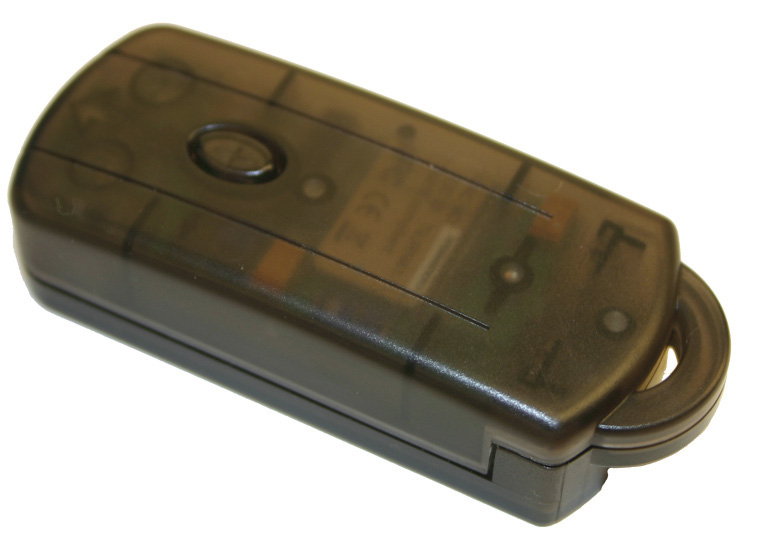
Since the BlackBerry devices don’t have infrared (which is needed to open Supra iBoxes), Supra created a fob that converts signals from the BlackBerry into infrared signals.
This should be nice for any agents that love their BlackBerry and don’t want to carry an ActiveKEY as well. While the BlackBerry Fob is another piece of equipment that you have to keep handy, it requires little maintenance, as it doesn’t need to be charged.
The BlackBerry Fobs are in-stock at our Portland, Vancouver, Eugene, Salem and Roseburg offices. At all other RMLS™ offices, you can call or visit and we will place an order for you.
For more information on using your BlackBerry as an eKEY, what types of BlackBerry devices are compatible and more, visit Supra’s website.
Update: I heard some folks are wondering what the fob looks like, so here is a photo of it:
by RMLS Communication Department | Aug 31, 2009 | Lockbox, Market Trends, Statistics
Lockbox activity up slightly
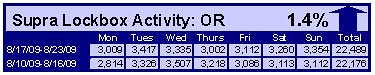
After a drop last week, lockbox activity bounced back in the week of August 17-23 compared to the prior week. In Washington, the number of times RMLS™ subscribers opened Supra lockboxes increased 4.1% and in Oregon activity was up 1.4%.
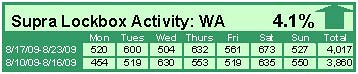
Click the chart for a larger view (Washington, top; Oregon, bottom)
Archive
View an archive of the Supra lockbox statistical reports on Flickr.

by RMLS Communication Department | Aug 28, 2009 | RMLS News
 Supra is releasing a firmware update for RMLS™ ActiveKEY users on Tuesday night, September 1. If your ActiveKEY’s radio is turned on, the upgrade will happen automatically. To verify that your ActiveKEY’s radio is turned on:
- Press your ActiveKEY’s On/Off button. The display should show “Ready for Use”.
- If the display indicates that the radio is off, you can press “1” to turn the radio ON.
According to Supra, here’s what you can expect from the update:
The new firmware will improve your ActiveKEY’s performance in several ways.
The Showing Notification ON/OFF feature enables you to extend your ActiveKEY’s battery life (operating time between battery charges) by turning off Showing Notifications on your ActiveKEY. A Showing Notification is a text message that is displayed on the ActiveKEY when an agent opens an iBox. You may opt to turn off Showing Notifications on your ActiveKEY if you:
- prefer to receive their showing notifications via email,
- do not have active listings,
- or do not use the showing notifications that are sent to your ActiveKEY.
With the new Battery Conservation feature, the ActiveKEY will no longer search for Showing Notifications during the off-peak hours of 9 p.m. to 9 a.m., Daylight Time. Our analysis shows that less than 2% of showings take place during this time. If you live in an area with poor cellular coverage, you may find that this feature increases your ActiveKEY’s battery life.
Finally, with the new Quick Charge feature it will take less time for your ActiveKEY’s battery to charge.
For a complete list of new firmware features, read: ActiveKEY Firmware Update 1.14
P.S. – Supra has also added a new “Safe Mode” feature if your key gets too hot. However, they still advise that you do not leave your key in spaces with extreme temperatures.

by RMLS Communication Department | Aug 27, 2009 | RMLSweb, Tips & Tricks

We know there are a lot of you out there who use Web browsers other than Internet Explorer… and as you are well aware… RMLSweb primarily supports Internet Explorer (IE).
However, we do want to clear the air about this situation, because things have changed a bit.
RMLSweb is now accessible utilizing most browsers. By accessible, I mean that you can log in and use the website, but we still highly recommend that you use Internet Explorer. We haven’t talked about it much because you should bear no expectation of being able to do all the same things that you can when using RMLSweb on Internet Explorer. But you can do many things and here is a list of what.
One omission you’ll notice is Listing Load. We aren’t allowing access to Listing Load in non-IE browsers because we know it has some limitations and we don’t want the listing content to suffer.
For Simplicity Sake: Scenarios When You Shouldn’t Use RMLSweb on Another Browser & When You Can
– If you want to get down to serious business (send reports, create a CMA, run statistics, enter a listing, prospecting/hotsheets), you should still use Internet Explorer.
– If you’re using a non-IE browser and just want to view a listing, do a search, or view a document – you should be okay.
But Why? Why is RMLSweb not compatible with all browsers?
Our focus has been and continues to be on updating RMLSweb in ways that will benefit all of our subscribers. But, while we’ve been doing that, we’ve also been working on browser compatibility – we’re just not doing it in one fell swoop.
RMLSweb was originally a system that we purchased. We then brought on our own development staff and through the years, they have been making RMLSweb our own system. However, there are still parts of it that are all written in the original code – which means those parts don’t work with other browsers.
However, each time we update something (like the recent mapping upgrades and new Forms & Documents search) we are writing it in code that should work with Firefox and other browsers. And, we still have some big updates to do, including CMA & statistics, which we tentatively plan to release in the next six months.
In other words, we could spend time rewriting the dated features of RMLSweb in code that will make it work with other browsers – but why spend time reinventing a dated product? Instead, the approach is to improve our existing product, and as we’re doing that, we are taking steps toward compatibility with each improvement.
You Can Help!
While we continue to work toward compatibility, there is limited functionality on non-IE browsers and we have not officially tested anything on them. So if you use a different browser and notice any issues – please e-mail those issues to helpdesk@rmls.com.